![Plico-LOGO_21-15-2.png]](https://help.plicoenergy.com.au/hs-fs/hubfs/Plico-LOGO_21-15-2.png?width=76&height=52&name=Plico-LOGO_21-15-2.png)
Every Redback Technologies system installed by Plico includes built-in blackout protection. A backup circuit, or multiple backup circuits, will be linked to your battery, which usually power your fridge, some lighting and power points when the grid is down.
You may need to switch on your blackout protection.
Your blackout protection may not automatically kick in when there is a blackout. To avoid your backup circuit becoming overloaded, your system may be placed in bypass mode. To switch on blackout protection, you'll need to put your BYPASS SWITCH in your inverter in the DOWN position.
Your backup circuits are engaged when the bypass switch is in the DOWN position. That means that in the event of a blackout, your home will have power from your Plico system to anything on your dedicated backup circuits. Generally, if you have no issues leaving your bypass switch DOWN, then you should leave it in this position until directed otherwise (during a software/firmware update for example).
If you experience mini-blackouts, this is because your backup circuit is becoming overloaded. In this case, you should leave your switch in the UP position and place it down during backouts.
Where can I find the BYPASS SWITCH?
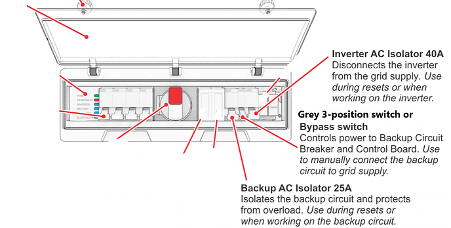
The bypass switch is located on the front of your Redback inverter under the plastic cover. This is also called the switchgear panel. To move the bypass switch, simply open the plastic cover and find the 3-position grey bypass switch. It can be placed in three positions:
Engaging the bypass switch (UP position)
To bypass your backup circuit (and avoid those mini blackouts caused by overloaded backup circuits), place the bypass switch is in the UP position, the backup circuit will be bypassed. This means that in the event of a blackout, the backup circuit will not be connected to your Plico system, and you will have no power. If there is a blackout and you want to activate the back-up circuit, simply move the switch to the DOWN position.
Reasons you may wish to keep the bypass switch UP include an overloading of the backup circuits, which can cause mini blackouts, and during software updates where the backup circuit may be switched off momentarily.
Engaging the backup circuits for blackouts (DOWN position)
Your backup circuits are engaged when the bypass switch is in the DOWN position. That means that in the event of a blackout, your home will have power from your Plico system to anything on your dedicated backup circuits. Generally, if you have no issues leaving your bypass switch DOWN, then you should leave it in this position until directed otherwise (during a software/firmware update for example).
Switching off backup circuits (MIDDLE position)
If the bypass switch is left in the MIDDLE position, the backup circuits are OFF. The bypass switch should not be left in the MIDDLE position. The MIDDLE position is used to reset the inverter if it goes offline, whereby the switch is moved to the MIDDLE position for five seconds and then returned to either the UP or DOWN position.
Always remember to close the plastic cover when you are done. The cover should ‘snap’ shut – this helps avoid condensation and water damaging the switchgear panel, as well as discouraging any creepy crawlies from making their home in there! Damage to the inside of your switchgear panel can void your warranty.
.png?width=670&height=327&name=Plico%20Redback%20Inverter%20bypass%20up%20(1).png)
As always, if anything is unclear or you need support, please complete a Member Support Form.